Reference Board & Art Direction Study
Standards (3)
10.3Visualization Techniques
Communicate and refine ideas through visual methods (e.g., diagrams, charts, mood boards, illustrations, wireframes, renderings, and storyboards).11.2Diversity of Perspective
Gather and synthesize information from diverse sources (e.g., research, interviews, observation, and experience) to develop original insight and perspective.1.3Cultural & Historical Influences
Investigate historical achievements, accomplishments, and advancements by industry pioneers, innovators, inventors from diverse genres, regions, cultures, backgrounds, and experiences.
The task
Build a complete reference board for the prop you’ll model as your midterm, organized into primary form, secondary form, and material. This board becomes the reference you actually work from for the rest of the unit, so build it like you mean to use it.
Canva is the tool for this assignment.
Deliverable: Reference board on your portfolio.
Before you start
Read Mood Boards and Reference (DESN-111).
Steps
Step 1 — Choose your midterm prop
If you haven’t already picked what you’re building for the midterm, decide now. Anything with clear mechanical or constructed shapes works well: a piece of equipment, a container, a tool, a device.
Step 2 — Gather primary form reference
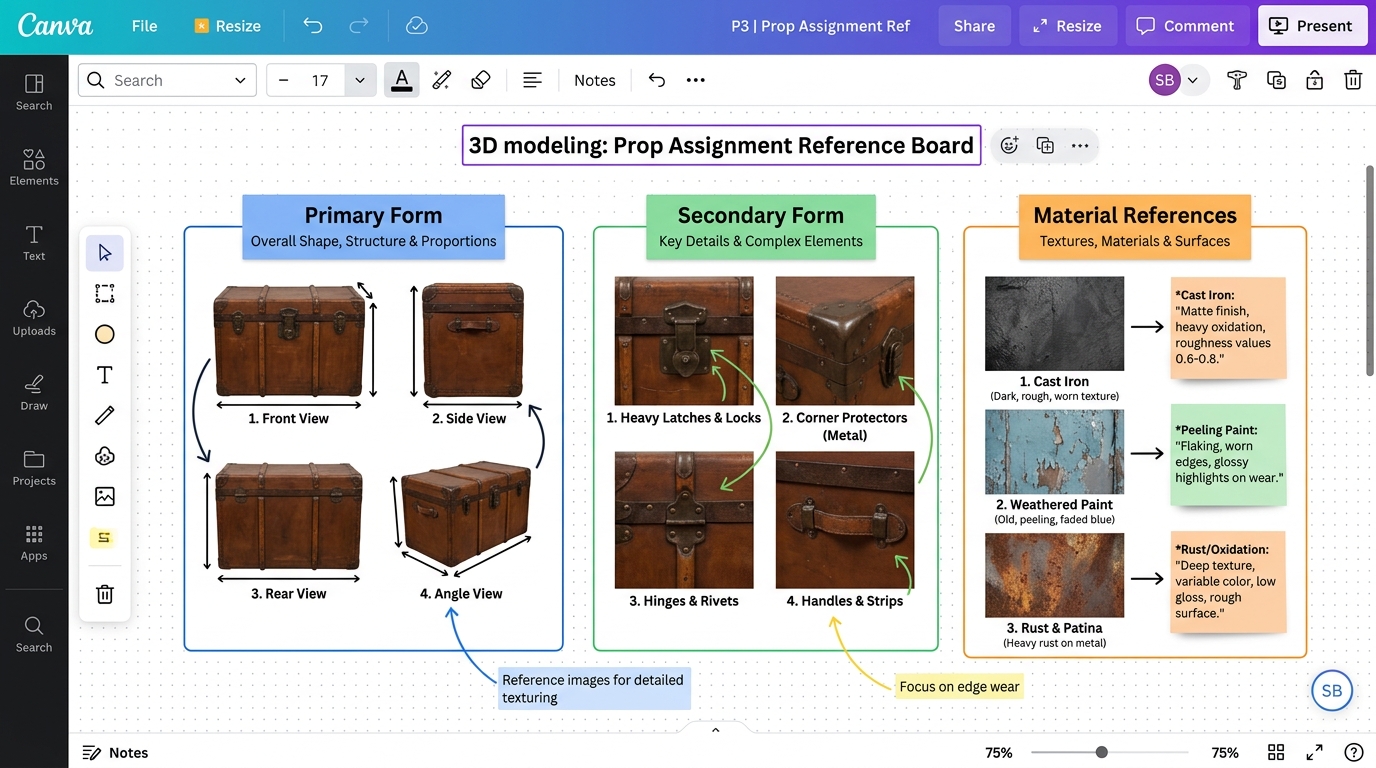
Find at least 4 images showing the object’s overall shape and proportion, from different angles where possible. You’re looking at silhouette and proportion here, not detail.
Step 3 — Gather secondary form reference
Find at least 4 images of the specific features: handles, hinges, vents, seams, panel lines, whatever makes this object particular rather than generic.
Step 4 — Gather material reference
Find at least 3 images showing what the object is actually made of, up close, with real surface detail visible. Wear, scratches, reflectivity, texture.
Step 5 — Build the board in Canva
Open a large canvas (a “Whiteboard” template works well since it isn’t locked to a fixed page shape) and arrange your images into three visibly separate, labeled zones: Primary Form, Secondary Form, and Material.
Step 6 — Write your callouts
For each material image, add a text box with one or two sentences: what is this material, and what does it do under light? “Brushed aluminum, matte, picks up soft reflections but no hard highlights” tells you something useful. “Metal” does not.
Step 7 — Export
Download your board as a single image (Share → Download → PNG or JPG).
Step 8 — Post it
Publish a standard write-up on your Coursework page, plus:
- Your board image embedded directly in the page
- Your material callouts written out
- One sentence on which reference image you expect to use most
Submit
Rubric
| Criteria | Approaching | Proficient | Advanced |
|---|---|---|---|
| Organization & Zones | Random image pile; zones are unlabelled or mixed together | Arranged into three visibly separate, labeled zones: Primary Form, Secondary Form, and Material | Flawless visual hierarchy; layout allows instant comparison across silhouette, detail, and surface |
| Form Reference Coverage | Fewer than 4 images per form category; single viewing angle | At least 4 primary form images from multiple angles and 4 secondary feature images | Comprehensive orthographic angles and detailed close-ups of mechanical joints, seams, and fasteners |
| Material Reference & Callouts | Vague descriptions (“metal”, “wood”); fewer than 3 material references | At least 3 close-up material images with specific surface behavior callouts (finish, light reaction, wear) | Production-ready callouts detailing roughness, subsurface behavior, patina, and light reflection |
| Portfolio Presentation | Missing image embed, callout text, or portfolio submission | Standard Coursework write-up with embedded board image, written callouts, and key reference reflection | Cleanly formatted portfolio post with insightful reflection on reference utility and modeling challenges |
Notes
- This isn’t a one-time assignment: Keep your board open and keep adding to it while you model. If you hit a question your current reference can’t answer, that’s a signal to go find more, not a reason to guess.
- A thin board produces a generic prop: The students whose midterm props look specific and considered are, without exception, the ones whose reference board was specific and considered first. This step is not preparation for the real work. It is the first part of the real work.
- Curious about PureRef? It’s the tool working artists actually use, mainly because it can float on top of Blender while you model instead of living in a separate browser tab. Free, and worth trying once you’re doing this regularly. Ask and I’ll get you set up.